

Is your business branded properly on Facebook?
Facebook has an option to set the name of your dental practice’s page (known as its “vanity URL.”)
Why would you want to do that?
Well, it’s the difference between having this as your business URL:
www.facebook.com/pages/Practice-Name/54647329281236
versus this:
www.facebook.com/pages/PracticeName
Which looks more professional?
Which is easier to remember, share and add to your print ads, videos, etc?
OK, you get it 🙂
So, to get started,have a quick look at your Facebook page and if you notice a long stream of numbers after your page name, we’ll need to get that set up right for you…
How to Claim a Facebook Vanity URL for Your Dental Practice:
1. Go to www.facebook.com/username
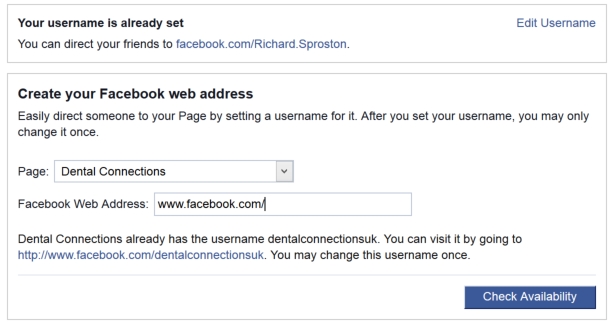
2. Click the “Page” dropdown menu and select your page title from the list that appears
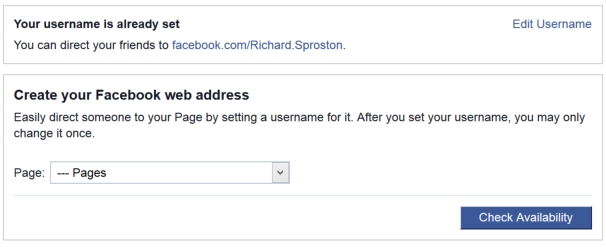
3. Type in the page name you’d like for your business (shorter is better) in the field marked “Facebook Web Address” and click “Check Availability”
4. If the name you’d like is available, you’ll see a message like this:
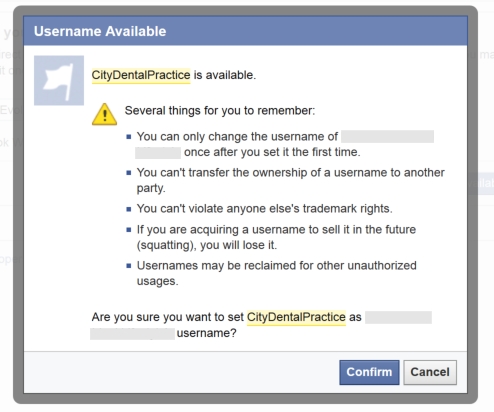
Click “Confirm” and you’re all set!
Note: if the name you’d like has already been taken, you’ll need to change it until you find one that’s available.
For most dental practices this shouldn’t be too difficult. By simply adding the word “practice” or “clinic” at the end of the name, you should be able to secure your business a name that’s easy to remember.
So, “City Dental” would become “City Dental Practice” and you’d end up with a decent vanity URL for your business…
Now go get yours before someone else does!